Posts

Showing posts with the label SQL Server

SQL: MAX() And MIN() Aggregate Functions

Image
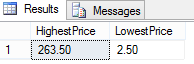
The MAX() function gets the highest value in the specified column, and the MIN() function gets the lowest value in the specified column SELECT MAX(UnitPrice) AS HighestPrice, MIN(UnitPrice) AS LowestPrice FROM Products The query above gets the highest and lowest prices for the Products table in the Northwind database  

SQL: DATEPART Function

Image
The DATEPART function extracts the date part of a date, for example using the 'yyyy' expression allows you to extract the year from a given date. The query below queries all the employees who were hired in the year 1994 in the Northwind Employees table. SELECT FirstName + ' ' + LastName AS Employee, HireDate FROM Employees WHERE DATEPART(yyyy,HireDate) = 1994 SELECT FirstName + ' ' + LastName AS Employee, HireDate FROM Employees WHERE DATEPART(MM,HireDate) = 10 The query above returns the records of employees who were hired on October

SQL: AVG() Aggregate Function

Image
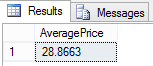
The AVG() function gets the average of a column, the following query gets the average of the UnitPrice column in the Northwind Products table. SELECT AVG(UnitPrice) AS AveragePrice FROM Products

SQL: COUNT() Aggregate Function

Image
The COUNT() function returns the number of rows in the specified table. There are two ways you can use COUNT(), which are the following: COUNT(*) count all the rows in the table including COUNT(column) return all the rows that contains value for the column, excluding the columns with null value SELECT COUNT(*) AS NumberOfRows FROM Customers The query above returns the number of rows in the Customers table SELECT COUNT(Region) AS NumberOfRows FROM Customers The query above counts the number of rows for the column "Region" that are not NULL

ASP.NET MVC 5 From Scratch : Create Entity Data Model With Entity Framework

Image
In our previous blogs we've created an ASP.NET MVC from scratch.  In this blog we are going to use Entity Framework as the ORM (Object Relational Mapping) as a conduit to our database, so that we can query our data as an object.  An ORM as the name implies maps database tables, views, and stored procedures as objects in a programming language so that developers can work with the data as objects. Step-by-Step Instructions: 1.  First we need to add the Entity Framework 6.1.3 to our ASP.NET MVC, we accomplish by right-click on "References" then select "Manage NuGet Packages" 2. On the search box type in "EntityFramework" no spaces, in the search result click on the "Install" button next to the "EntityFramework" package. 3.  Click "I Accept" on the "Licence Acceptance" screen 4. Click "Close" 5.  Once the "EntityFramework" package has been added you will see a green checkmark next to the "E...

Installing The Northwind Sample Database From Microsoft

Image
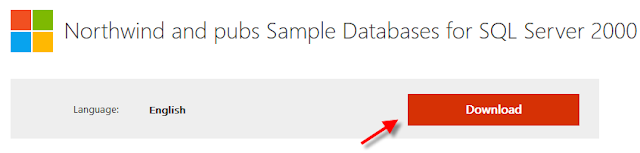
The Northwind sample database is probably the most mention sample database of all time.  Most of the tutorials on the web uses the Northwind sample database as an example.  However, it's not as straight forward to add the Northwind database to your SQL Server instance as you may have think.  The reason is because the Northwind database was initially created for SQL Server 2000.  Therefore, most of the newer versions of SQL Server will throw an error when you tried to attach the .mdb file.  It is easier to run the SQL script that is provided with the download.  In this blog we will go over where to download the Northwind sample database, and how to add to your SQL Server instance using the SQL script. 1. Open your browser and type in the following URL in the address bar https://www.microsoft.com/en-us/download/details.aspx?id=23654 2.  Click on the "Download" button 3.  Save the SQL2000SampleDb.msi file to a location that you will remember in your ...

XML In SQL Server Part 1: Storing XML In SQL Server

Image
There times when you have to store data as XML in a SQL Server database table.  In this blog we will go over how to store XML as data in SQL Server.  There's an xml data type in SQL Server that we can use to store XML data. Example: Create a database table that contains a column to store XML data using the xml data type CREATE TABLE Books ( Id INT NOT NULL IDENTITY(1,1) PRIMARY KEY, Book XML NOT NULL ); If you look at the "Book" column for the table "Books" you will see that it has a data type of XML Now that we have our table set up, we can insert XML data to into the table INSERT INTO Books(Book) VALUES( CAST ( '<book> <author>Bill King</author> <title>ACME Consulting: An Inside Look</title> <publisher>ACME Publishing</publisher> <language>Swahili</language> </book>' AS XML)); In the example above we CAST the type to XML first before we insert the data into the Books column becau...

T-SQL : WHILE Loop Syntax

WHILE SomeConditionTrue BEGIN -- Execute code here END

T-SQL: IF Conditional Syntax

IF SomeCondition BEGIN -- Execute some code here END ELSE BEGIN -- Execute some code here END Else is optional

T-SQL Basics: Variables

T-SQL variables allows you to store and assign values in your T-SQL code.  Variables is a storage unit in programming which allows you to refer back to it at a later time. T-SQL variables have the following characteristics: Local variables must be prefixed @ Global variables must be prefixed with @@ Must be declared with the DECLARE statement Must specify the data type when declared Declaring variables DECLARE @employeeID INT; DECLARE @firstName CHAR(10), @lastName CHAR(20); As you can see from the above example you can declare a single variable or declare multiple variables with a comma separated list. Setting variables SET @employeeID = 1; SET @firstName='Davolio'; SET @lastName='Nancy'; The above example uses the SET statement assign values to the variables one at a time. To assign values to multiple variables with one statement you can use the SELECT statement. SELECT @employeeID=1,@firstName='Dovolio',@lastName='Nancy'; Convert INT ...

SQL : TRANSACTION

Transaction processing is a concept in SQL that allows you to execute a query or rollback the changes if something goes wrong.  A way of enforcing the data integrity of the database.  As such, you can only rollback INSERT, UPDATE, and DELETE.  Not that there's any use in rolling back a SELECT statement because there's no change in data. The following is how you would wrap a transaction around a DELETE statement: BEGIN TRANSACTION DELETE Products WHERE ProductID = 87 COMMIT TRANSACTION The above query will only execute if there are no errors, if there's an error the transaction will be rolled back. That's it, that's the whole concept of what a transaction is, if there are no errors then you should get the following message. (1 row(s) affected) If you are dealing with multiple statements then you can use the SAVE TRANSACTION, SAVE TRANSACTION allows you to create a placeholder so that you can rollback a transaction at a checkpoint. For example if you were to INSERT a...
SQL: SUM() Aggregate Function

Image
The SUM() function is used to sum up all the values in the specified column. SELECT SUM(UnitsInStock) AS TotalInventory FROM Products The above query gets the total number of units in stock for all products

SQL: SOUNDEX Function

Image
The SOUNDEX function is a cool function that you can talk about at your next dinner party. It searches for the words that sounds the same but are not. Like the query below, which queries product names that sounds like the word "Chief" in the Northwind Products table. SELECT ProductName FROM Products WHERE SOUNDEX(ProductName) = SOUNDEX('Chief')

SQL: Mathematical Operators + , - , * , /

Image
As you may have guessed the SQL mathematical operators are equivalent to their regular mathematical counter parts.  + Addtion - Subtraction  * Multiplication  / Division Eamples: 1. Addition SELECT UnitPrice, (UnitPrice + 20) AS RipOffPrice FROM Products 2. Subraction SELECT UnitPrice,(UnitPrice - 5) AS OutOfBusinessPrice FROM Products WHERE UnitPrice BETWEEN 5 AND 10 3. Muliplication SELECT UnitPrice,(UnitPrice*UnitsInStock) AS InventoryPrice FROM Products 4. Division SELECT UnitPrice,(UnitPrice/2) AS HalfPrice FROM Products